How readers select books

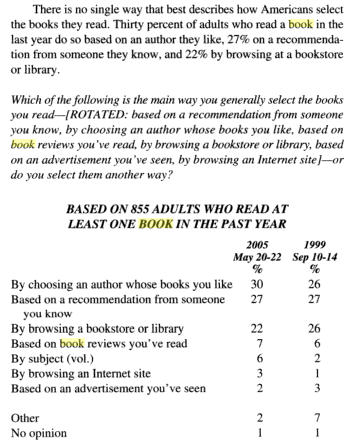
Gallup did a poll in 2005 asking readers how they selected the books they read. Here are the results.
gallup-poll-how-readers-select-books

What this says to me as an author is that the most important thing I can do to help my career is write the best dang story I can, seeing that almost 60% of what readers select is driven by the experience they or someone else had with the book.

The next most important factor has to do with helping my book stand out for browsers. This would include the cover, store placement, blurbs, flap text, and the opening pages. The only part of this an author can really focus on is the opening pages–again, writing the best dang story I can.

So it seems authors, especially debut authors, can’t do much to affect sales. But not being able to do much doesn’t mean they can’t do anything. Somewhere, somehow the first readers have to be enticed to give the book a go. Robert Sawyer talks about some of the methods to do that here.

EDIT: 4/8/2011

Kris Rusch adds more information that confirms the findings of the poll above in “The Business Rusch: Promotion”. READ HER WHOLE ARTICLE. Notice she does concede that publishers can get some notice for a book. So there ARE things that can be done to make the offer. But I agree with her advice that the best thing to do is get more product out the door. The studies she cites are:

2010 Survey of Book-buying Behavior by VERSO Advertising. The key conclusion on book-buying is that “Multiple factors impact consumer awareness of a particular title, but final purchase decision (online and offline) driven by author reputation, personal recommendations, and price.” If I were you, I’d read the whole presentation.

# Reason % Respondents
1 Author reputation 52%
2 Personal recommendation 49%
3 Price 45%
4 Book reviews 37%
5 Cover artwork/blurbs 22%
6 Advertising (including on-line) 14%

2007 Survey on what motivates readers to by a book by Spier Advertising, reported in Publishers Weekly

# Reason % of Respondents
1 Friend’s Recommendation 49%
2 Familiarity with Author 45%
3 Description on Jacket 32%
4 Reviews 22%
5 Advertisement 21%
6 Place on bestsellers list 17%
7 Reading group pick 16%
8 Cover design 12%
Share

Similar Posts

  • Exposition, Character Description, Curiosity vs Suspense

    Another great podcast from the writing excuses team. This time with Patrick Rothfuss (I did love his book) on writing exposition.

    http://www.writingexcuses.com/2008/09/15/writing-excuses-episodes-32-talking-exposition-with-patrick-rothfuss/

    One comment that stood out was Brandon’s conscious choice to leave some explaining to chapter 6 of Mistborn. Not only did it make the beginning more accessible, but it actually created a sense of mystery about Kelsier. I wanted to know more.

    Although, I would caution new writers that when Rothfuss talks about withholding, he’s talking about setting. He’s not talking about keeping the story from the reader. You can’t build suspense if you hide what’s going on, the dangers, etc. You can build a bit of curiosity, but that only holds the reader’s attention for a short time. Give information for suspense. Withhold for curiosity. They are two different things.

    To get a sense of proportion on exposition or broad brushing a character, I recommend Bernard Cornwell’s writing advice: http://www.bernardcornwell.net/chapters/writingadvice.htm

    Take a book you love, get a colored pencil or crayon, then begin reading. When you find a passage of descrition/setting, draw a line along the side. After 30 or so pages of doing this you’ll begin to see how much setting the author puts in and how he goes about doing it. Do this with a few stories you love and you’ll begin to see patterns.

    You can do the same thing with character. In fact, I just finished FEAR NOTHING by Dean Koontz. Loved how he did his characters. So I’ve got a used copy and a copy of VELOCITY and am marking them up. I’ve gotten a number of very interesting insights.

    Share
  • The eBook Tsunami of Crap is Crap

    Some folks say ebooks will foist a terrible problem upon readers–they’ll soon have to wade through mountains of crap to find a book to read. It will be a terrible chore. J.A. Konrath gives his answer to this lament. Kris Rusch gives hers.

    Here’s mine: there will NEVER be a tsunami of crap facing a reader looking to buy ebooks or any other kind of book. Ever.

    Why?

    REASON 1

    Buyers REFUSE to look at seas of choices–crap or otherwise. Shoppers always seek to limit choices (too costly to look at everything) and use a number of methods to immediately narrow those choices down: recommendations, reviews, what’s on the shelf, etc. (For a fascinating look into a few facets of how we make choices, listen to this Radio Lab espisode.)

    For example, when shopping for vanilla you don’t go searching through the 500 brands available online and in various stores–Mexican, Vodka, American, Rum, organic, generic, brand, etc. It’s just not worth the time. Something on the shelf is usually GOOD ENOUGH.

    Likewise, nobody cares to look at 150,000 titles to find the best. They don’t have the time. In fact, they don’t need to. They can usually find a number of books that are intriguing enough in the “smaller” selection any given vendor sets before them.

    In the case of Amazon ebooks, that selection is the best-sellers, the ads, and the this person bought that.

    Nobody ever sees the 4 gazillion books. Ever. They don’t want to.

    REASON 2

    Vendors can’t display a gazillion choices, even if they wanted to, which they don’t (studies have actually shown that providing shoppers too big a selection leads to FEWER sales).

    And no, just because Amazon says it have 2 quintillion titles for sale that does not mean they’ve been displayed. You only see a handful of titles at a time.

    Even if you scroll through the various lists, you are rarely looking at more than a dozen choices at a time. You’ll probably see less than 200 titles total any given time you go shopping.

    Vendors NEVER display a tsunami. EVER.

    REASON 3

    Readers have MORE THAN ENOUGH leads to fill their capacity for reading.  Even if they wanted a sea of options, they wouldn’t wade through them because they don’t have to–it’s too easy to find something to read.

    Leads are everywhere. There are recommendations from friends, family, reviewers, celebrites, and Amazon’s this person bought that.  There are leads from best-seller lists (another type of tacit recommendation). Leads from browsing.

    Readers have leads coming out their ears.

    This is important because the number of leads any given reader has far excees that reader’s capacity for reading.

    How long does it take you to find one book that looks interesting? From browsing or recommendations or whatever?

    Minutes.

    Maybe if you’re having a really bad day, it takes an hour. But it takes so much longer to read one story than it does to find one you want to read.  That’s why we all have two year’s worth of books to read in our queues.

    So. There is no sea of crap. There NEVER was or ever will be one for any given reader.

    Buyers avoid selection seas like the plague. Vendors don’t provide such seas anyway. And readers don’t need them–they have more than enough leads which turn out to be exciting enough to fill up all their reading slots and more.

    Share
  • |

    How to Write a Story that Rocks

    Folks, a huge thanks goes to Stephen Nelson for putting all this together. You may kiss his hand when you see him.

    This is a recording of “How to Write a Story that Rocks,” a two-hour seminar Larry Correia and I just put on at the annual BYU’s Life, The Universe, & Everything symposium. I think we had 130-140 people attend. This symposium is focused on writing fiction. And while the panels and presentations do include things specific to the science fiction, horror, and fantasy genres (both adult and young adult), a lot of time is also spent on story writing fundamentals that apply to ALL genres. So when I developed this workshop, I made sure I took the fundamental approach.

    The two-hour seminar has been broken down into 12 segments. To switch between the segments:

    • Hover your mouse pointer over the YouTube below
    • Click the forward and back arrows that appear on the right and left sides to move to the next or previous segment, OR 
    • Scroll through all 12 segments and select the one you want using the playlist control at the bottom

    If you prefer, you can watch all 12 on the How to Write a Story that Rocks YouTube playlist page.

    I’ve found whenever I develop any presentation or training that it takes a few iterations and revisions before it’s the best it can be. This is the first iteration of this seminar. And so below this video I’ve provided additional comments on each segment explaining key concepts, principles, and techniques that we might have failed to discuss or convey as clearly as we’d hoped. Enjoy!

    Handout

    How to Write a Story That Rocks – Handout

    Segment 1

    It’s documented–right-wing gun nut Larry Correia sang “Kumbaya.” What’s next? The hugging of small trees? Oh, Larry, the disilluion. The disillusion.

    The reason why I had Larry sing was not for his mellifluous performance, but to demonstrate the difference in reactions between him and our happy volunteer (“Country Road” by John Denver–this really was a love fest). The volunteer balked because he hadn’t taken any thought to know what to sing before he was commanded to do so. On the other hand, Larry and I had spoken before the seminar. So Larry had something to sing BEFORE he sang it. It’s a simple demonstration, but it illustrates a principle a lot of new writers forget. Writing is a performance. It helps to know what it is you’re going to perform before you perform it.

    It’s one thing for you to tell yourself to write. It’s much easier to tell yourself to write the scene where the rancher finds out one of his illegal ranch hands has been kidnapped.

    Now this doesn’t mean that you have to know everything. Or that you can’t write exploratory drafts to figure out what it is you want to write. But it does illustrate that whatever techniques you use, you’ll be a lot more effective in your writing when you have something to say first.

    But what do you develop? What are the things that bring the story to life? How do you go about getting those things to say? That’s precisely what I wanted to address in the seminar. In the segments that follow, I try to:

    1. Explain what I’ve found are the most important things to develop, the things that define the essence of story, that make the story come alive in the writer’s mind–the things that really matter
    2. Demonstrate techniques to develop those things so you have something to say

    Segment 2

    I think this segment went fairly well. What rocks will different from person to person, even though there will often be a huge overlap between people. So it’s important for authors to seek to develop the kinds of stories that rouse their passion. Watch this interview with best seller Debbie Macomber to see what I mean. So I can’t tell you what to write about. Or if whath you think rocks will resonate with a large number of people. However, what I can do is share the techniques I use that have been most productive in helping me develop initial ideas into something that has much more power.

    You can use the techniques to juice up any of the four parts of story. However, I will say that I find that the most productive, the most important parts, are character and problem. Plot and setting are important. I love them and work to juice them up. But when I get a good character and problem, that’s when the writing seems to flow the easiest.

    And no, I don’t list theme as a part of story. Everyone talks about theme, but when I read what they have to say or press them for examples, it seems that it always either boils down to (1) a story element or topic that’s repeated, (2) a story problem/issue stated in an abstract manner, or (3) some moral situation. Les Miserables is about the “theme” of mercy versus justice. But saying justice versus mercy is just an abstraction of the story problem and dilemmas the story deals with. So, no theme. 

    Segment 3

    Loved this bit about scenes from David Mamet: http://www.slashfilm.com/2010/03/23/a-letter-from-david-mamet-to-the-writers-of-the-unit/ 

    Segment 4

    I’ll be adding my comments to the rest of these segments over the next few days.

    Segment 5

    Segment 6

    Segment 7

    Segment 8

    Segment 9

    Segment 10

    Segment 11

    Segment 12

    Dan Wells on Story Structure

    Check it out: Dan Wells on How to Build a Story (story structure). I find Dan’s “start with the ending” technique helpful as well as thinking about a worst fears realized moment. Watch the videos and see if there isn’t something there that can help you develop your story idea.

    You can get the PowerPoint of How to Build a Story on Dan’s site.

    If you find this approach useful, you might want to check out what novelist Larry Brooks has written about the same material on StoryFix.com.

    Share
  • |

    Audio for my presentations

    Folks. I have 2 mp3 files. One for Story Turns. One for Vivid & Clear. They are each about 48mb in size. But I don’t have the time to figure out how to make them available to you.

    But I know someone out there does have the skillz to mash the slides with the audio in a short period of time and make it available. Maybe create something to upload to YouTube.

    So if you have been waiting for this and would like to offer your services, I’d be happy to throw in a free copy of the ebook edition of Bad Penny and Servant for your efforts. It would in no way cover your time, but it’s better than a poke in the eye with a sharp stick. And the project will also give you all sorts of glowy goodness inside knowing that you’ve served a whole bunch of writers.

    That’s my offer: glowy goodness and ebooks.

    If you’re interested, click my picture in the left sidebar and and let me know 🙂

    Share
  • How much does author Jim C. Hines make?

    Dear But-All-Writers-Are-Rich,

    Jim C. Hines is a hard working midlist author with a couple of fun series out. Hines reveals what he makes in his post 2011 Writing Income. More importantly he reveals what he’s been making for a few years. For more information on advances etc., please peruse my page on Writing Business Facts & Figures.

    Sincerely,

    The Man

    Share
  • Edward Bear Shares His Proofreading Secrets

    One of the things I enjoy about being an author are the emails I receive from readers. A few months ago I received one from Mr. Edward Bear. He’d purchased Servant and, as he was reading, found an unclosed dialogue quote.

    Mr. Bear could have simply noted it and read on. But he did not. Mr. Bear is a proofreader. And so he practiced a bit of wizardry, found that I had a handful of quote goofs, and emailed them to me.

    Many of them ended up being weird smart quote issues Word introduced into the text when I broke a line of dialogue with an action like this: “You will not”–he scratched his nose angrily–“share another pair of my panty hose with that woman!”

    You’d think that would be enough for a doughty reader. But Mr. Bear didn’t just notify me of the errors. Oh, no. He also included the page from his proofreader’s grimoire that allowed him to find those quote issues in a matter of minutes in the first place.

    As soon as I had the time, I tested the spell on Bad Penny, and, voila, in a matter of a few minutes found a couple of issues in that text. I was delighted.

    But Mr. Bear wasn’t satisfied with mere delight. He then sent me another page from that grimoire to help with spelling. We luvs wizardly readers, Precious.

    Copy editing and proofreading require patience, painstaking reading, and a knowledge of what to look for. You have to know not only the mechanics of the written word (capitalization, spelling grammar, syntax, punctuation, abbreviations, usage, etc.) but also, if you’re reading for a printed edition, interior formatting (widows, orphans, word or hyphen stacks, headers, and so forth). There’s a lot to it. And anything that speeds up the process and minimizes errors is welcome.

    If you’re contracting your proofreading out, a cleaner copy can also translate into lower rates. Knowing that many of you who visit this website are writers, and because your host’s generosity knows no bounds, I asked Mr. Bear if he might be willing to share his wizardry with you. The wizard responded with a yes.

    Augmented Proofreading 1

    By Edward Bear I’m Ed Bear. I work, both professionally and otherwise, as a proofreader. I’ve gone over books for my publisher and I’ve done scan/OCR/check against paper books for republication, both electronic and back-to-treeware. When I mentioned some of the “ancillary tools” I have for aiding the work, John offered me this guest post slot in his blog. Feel free to pass this stuff around. I’ve found these techniques invaluable in getting the job done faster, and with better quality.

    First, though, I need to tell you about the tools themselves. The biggest component is the software for electronic text editing. However, I’m NOT talking Word or anything like that. I’m talking about an editing program which can a: work with plain text and b: handle Regular Expressions. (What are those, some of you ask? I’ll get to that.)

    Since I’m a windows user, I have two such programs available. My favorite is a program called TextPad (www.textpad.com).  I’ve used it for years and it’s become invaluable to my work. They currently charge $28 for a single user license, but IMO, the program’s so useful that, even though upgrades are free, I buy another license every time they bring out a new major release. The other program is free. It’s called NotePad++ (http://notepad-plus-plus.org/) I’ve tested it and it can handle the methods I use, but I haven’t used it much, since TextPad and I are long-time buddies. If anybody out there knows a program for the Macintosh which will do these jobs, please mention it in the comments.

    Regular Expressions

    You don’t have to be a wizard to use them. The tutorial over at http://www.regular-expressions.info/tutorial.html describes them elegantly:  “Basically, a regular expression is a pattern describing a certain amount of text.”  They are also called a regexp or regex, and I’ll be including the regexes I use in this post.

    I have a small library of regexes, and two of them are critical to aiding the proofreading process. One of them allows checking dialogue quotemarks, to insure that speech is properly closed off, and the other makes it possible to generate a word list of each unique word in the  book. I’ll be walking through the usage, including screenshots.

    Quote Checking

    One of the challenges of checking dialogue passages is that, with one exception, every opening quote (“) needs to have its matching closing quote (”). The exception, of course, is when the same character is speaking in the next paragraph. This can lead to a heavy false positive load if the characters are loquacious.

    The first time I tried this stunt, I found  73 paragraphs with unbalanced quotes. Only 6 of them were errors. But being able to find them quickly so they could be fixed in minutes instead of hours? That paid for the effort.

    The process itself is simple: You take the document and convert it to plain text. If it’s an RTF or Word document, you simply select ALL, hit copy, and paste it into Textpad.  The result will look something like this:

    image001

    What I normally do is turn on word wrap, so I can see the whole paragraphs as I go. So it looks like this:

    image002

    Now, we go hunting. The next step is to set up the search pattern using a regex. The one I use for this is the following: (?!^([^“”\r\n]++|“[^“”\r\n]*”)*$)^.+ Complicated little brute, isn’t it. I didn’t write it, but I knew who to ask if he could write one, and the above is the result. FYI, there’s also one for straight quotes: (?!^([^”\r\n]++|”[^”\r\n]*”)*$)^.+ You use it the same way. So go into find, and put the regex into the “Find what:” box:

    image003

    Notice that the “Regular expression” box is checked. I also “Wrap searches” just in case I miss something and want to loop around. Click “Find Next” and:

    image004

    The paragraph highlighted has two opening quotes, one at the beginning and one at the end. Word assumes that a quote preceded by a space is an opening quote, so you need to correct it in your RTF/DOC. Wash, rinse, repeat. You keep doing “find next” all the way through, checking for situations like the following:

    image005

    As I said, same speaker, next paragraph, so this one is good. This post is getting a little long for a blog entry, what with illustrations, so I’ll break off here. Stay tuned for part two: checking spelling and spelling consistency. In the meantime, here are the RegEx tool commands plus a few bonus goodies: RegExToolCommands.

    Share