Indie Thoughts: The Kind of Competition Publishers Want

David Gaughran puts it all into perspective.

Since the huge shift to online purchasing and e-books, a common meme is that there is some kind of “discoverability” problem in publishing.

The funny thing is readers don’t seem to have any problem finding books they love. Any readers I talk to have a time problem – reading lists a mile long and never enough hours in the day to read all the great books they are discovering.

The real discoverability problem in publishing is that readers are discovering (and enjoying) books that don’t come from the large publishers. What these publishers have is a competition problem not a discoverability problem.

They have reason to. I had a stab last year at estimating how much of the e-book market self-publishers have grabbed in the US, pegging it at around 25%. The much more rigorous Author Earnings reports have confirmed that estimate, showing that self-publishers had captured 30% of the unit sales on Amazon and Barnes & Noble.

* * * *

So when large publishers say that the discoverability puzzle hasn’t been solved online, they are really expressing despair at retailers recommending books not published by them.

And when large publishers say that online retailers haven’t matched the experience of buying in physical stores, they mean that they wish there was some way to relegate all that stuff from small publishers and self-publishers to the warehouse, and have tables piled high with James Patterson and Snooki.

* * * *

The fear-mongers always forget Amazon’s core philosophy: recommend the product the customer is most likely to purchase. It’s interesting to note that this is the exact opposite of traditional co-op: recommending the book that the publisher wants purchased.

While it’s revealing to look at sites like Bookish and consider what Big Publishing would do with retail or discovery, we already know what it does with self-publishing. Exploitative vanity press Author Solutions runs self-publishing companies for HarperCollins, Simon & Schuster, Harlequin, is owned by Penguin Random House, and is now recommended by Publishers Weekly.

Large publishers want to decide what gets published, what gets distributed, what gets recommended, what gets discovered, and what gets sold.

Amazon – and the digital revolution it instigated – has made that impossible.

Anyone can publish. Distribution has been blown wide open. Large publishers have lost power over what books get recommended and discovered too, with the agnostic approach of sites like Amazon, Goodreads, and BookBub. And large publishers have definitely lost control of what is getting sold: self-publishers have grabbed a huge chunk of the market, and more and more writers are beginning to realize they don’t need a publisher to reach readers and make money.

This is the real reason why Big Publishing hates Amazon. Large publishers face real competition for the first time and they don’t like it one bit.

More at Let’s Get Visible.

Publishers have lost the barriers to entry that used to keep most of the competition out. Amazon set up a totally new distribution channel that has grabbed at least 41% of the book market.

Forty freaking one percent!

And of that 41% percent, it appears self-publishers have about as much of that channel as traditional publishers do.

Think about that for a second.

Almost half of book distribution is now out of publisher control. With no barriers, the hordes are running in to sell their books, pushing publisher books out of the good spots. The number of competitors is growing. And the publishers can’t get Amazon to relegate the riffraff to the back rooms. Can’t get them to feature only their books.

Worse still, it appears lots of readers don’t mind that at all.
Edward Bear Shares More Proofreading Secrets

Mr. Edward Bear (pseudonym) shared an awesome secret for sussing out quote issues in a previous post. He’s back with a nifty way to help spot spelling issues.  It helped me spot a number of inconsistencies in Bad Penny, which I recently fixed. Take it away, Mr. Bear.

* * * *

Augmented Proofreading 2

Last time, I mentioned checking spelling and spelling consistency, and this note is to fulfill my promise.

To begin with, I’ll admit freely I do not recommend just running a spieling chucker over the text. And yes, I’m using the phrase deliberately. The spelling checker in the program I’m using to write this just waltzed right past it, despite the fact that neither word makes sense in this context. I got started trying to get some mileage out of spelling checkers a while back, when I realized that OCR scanners will work like hell trying to find a word and probably will come up with a word, but it will be the wrong word. Over at Project Gutenberg, they use the term “scanos” as an analogue of “typos.”

The other adversary is consistency of spelling and usage. Examples might include “canceled” and “cancelled” or variant possessives, such as “Jones’” and “Jones’s” in the same text, or simply variant spellings of the same character’s name, such as “Erik” and “Eric.”

So what do I do for these sorts of problems?

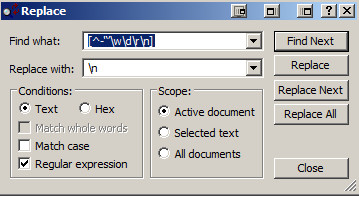
What you need is a list of all the unique words in the story, and it’s easy with a dollop of regex. (See the first post on this topic. The one I’ve taken to using is the following:

[^-‘‘’\w\d\r\n]

This one I can explain, since I wrote it. 🙂

What it says is to look for any individual characters within the brackets([]). The leading caret (^) says “Nope, they should not be in this list.” Following that are the hyphen(-), the straight  quote(‘), and the opening and closing curly single quotes(‘’). After that, it’s any character that would normally be in a word (\w), any digit (\d), any carriage return(\r) or any new line aka paragraph terminator (\n).

And what you do with the above is to set Textpad (see previous post again) to replace all of them with a newline (\n) character.

Here’s what the search and replace box in Textpad looks like for this:

Augmented Proofreading image001


Notice that the “Regular expression” box is checked. And then you choose “Replace All”.

The result is to turn this:

Once upon a night we’ll wake to the carnival of life
The beauty of this ride ahead such an incredible high
It’s hard to light a candle, easy to curse the dark instead
This moment the dawn of humanity
The last ride of the day

into this:

Once
upon
a
night
we’ll
wake
to
the
carnival
of
life
The
beauty
of
this
ride
ahead
such
an
incredible
high
It’s
hard
to
light
a
candle

easy
to
curse
the
dark
instead
This
moment
the
dawn
of
humanity
The
last
ride
of
the
day


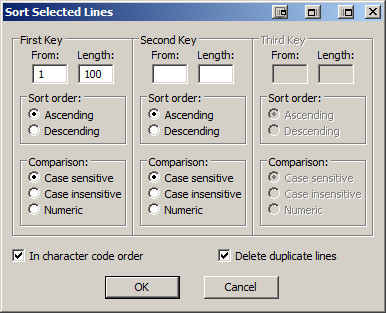
For a book, this means what you have as a multi-thousand line long document and LOTS of repeated words. The next step is to lose the repetitions by sorting the list. For TextPad,  you’ll find Tools->Sort on the menu bar, and I generally set the sort up as the following:

Augmented Proofreading image002

This is a case-sensitive sort and “Delete duplicate lines”, of course, gets rid of all the duplications of words like “a”, “an”, and “the”.

For the above text, you get:

It’s
Once
The
This
a
ahead
an
beauty
candle
carnival
curse
dark
dawn
day
easy
hard
high
humanity
incredible
instead
last
life
light
moment
night
of
ride
such
the
this
to
upon
wake
we’ll

34 unique words.

And here’s the payoff for all this funky text munging: Run a spelling checker over this, and it will find typos, of course, but it will also generally complain about most names, which aren’t generally kept in spelling checker dictionaries, and it will also show you words and their variants, nestled fairly closely together. Here’s an example from one of my projects:

Swiss-born
Take
Talking
Tallmadge
Tallmadge’s
Tarelton
Tarleton
Tarleton’s
Tavern
Tecumseh
Tell
Ten
Thames

The spelling checker landed on Tallmadge and its possessive form, but do you notice the “Tarelton” on the list? That’s the time for the Aha!, and you can fix the “Tarelton” form. The same thing applies to possessive variants and any other variant form you find.

As with the last post, I’ll be peeking in on the comments and answering any questions that come up.

Indie Thoughts: Resources for Indie Writers

About this time last year I got the last of my rights back to the Dark God properties. I thought it would take twenty or thirty hours to figure out the whole indie publishing thing. And then the awesome John Brown story machine would kick in gear.

Reality promptly woke me up and slapped me around a bit. This last year has been quite the learning curve. Here’s what I’ve had to pick up:

  • Designing book covers
  • Finding artists
  • Working with artists in a way that actually works
  • Copy editing
  • Formatting book interiors
  • Fonts, fonts, fonts
  • Using ISBNs
  • Using InDesign to create files for both POD books and epubs
  • eBook structure
  • Editing ebooks (okay, just get Calibre ebook editor right now. We luvs it, Precious)
  • Validating ebooks (http://validator.idpf.org/)
  • Converting epubs to Amazon’s mobi format
  • Uploading ebooks to the various ebook retailers: Amazon, NookPress, Kobo, iTunes (I upload via Draft2Digital), Smashwords
  • The pros and cons of CreateSpace vs Lightning Source
  • Using CreateSpace to publish POD books
  • Registering books with the US Copyright Office
  • Writing better book descriptions
  • Using keywords and categories on Amazon
  • Setting prices in the indie market
  • Creating an email list (I love MailChimp. They make me happy every time I go to their site)
  • Advertising and promoting as an indie

One of the things I love about this business is that there is always more to learn. But I’m happy to be over that curve. For folks just starting out, let me share some of the resources I found super helpful with a number of the things listed above.

Posts by a mega indie-seller Russell Blake to give you the right perspective about indie publishing. I’ve read a lot of posts the last few years about being an indie author. These are the best I’ve come across.

Online courses to help you on the publishing side.

  • Designing Book Covers and Designing Book Interiors with Dean Wesley Smith (look for “Online Workshops”). I don’t agree with Dean on all his ideas about pricing and promotion, but these two courses helped a great deal.
  • InDesign CS6 to EPUB, Kindle, and iPad with Anne-Marie Concepción at Lynda.com. Awesome.

The most practical and clear-headed books about indie promotion I’ve read. For other clear-headed advice, see the Russell Blake posts above.

The most helpful book on copyright.

The most helpful book on copy editing as well as info to put into front and back matter.

Helpful threads on Kindle boards

Other great resources

Good luck!

Edward Bear Shares His Proofreading Secrets

One of the things I enjoy about being an author are the emails I receive from readers. A few months ago I received one from Mr. Edward Bear. He’d purchased Servant and, as he was reading, found an unclosed dialogue quote.

Mr. Bear could have simply noted it and read on. But he did not. Mr. Bear is a proofreader. And so he practiced a bit of wizardry, found that I had a handful of quote goofs, and emailed them to me.

Many of them ended up being weird smart quote issues Word introduced into the text when I broke a line of dialogue with an action like this: “You will not”–he scratched his nose angrily–“share another pair of my panty hose with that woman!”

You’d think that would be enough for a doughty reader. But Mr. Bear didn’t just notify me of the errors. Oh, no. He also included the page from his proofreader’s grimoire that allowed him to find those quote issues in a matter of minutes in the first place.

As soon as I had the time, I tested the spell on Bad Penny, and, voila, in a matter of a few minutes found a couple of issues in that text. I was delighted.

But Mr. Bear wasn’t satisfied with mere delight. He then sent me another page from that grimoire to help with spelling. We luvs wizardly readers, Precious.

Copy editing and proofreading require patience, painstaking reading, and a knowledge of what to look for. You have to know not only the mechanics of the written word (capitalization, spelling grammar, syntax, punctuation, abbreviations, usage, etc.) but also, if you’re reading for a printed edition, interior formatting (widows, orphans, word or hyphen stacks, headers, and so forth). There’s a lot to it. And anything that speeds up the process and minimizes errors is welcome.

If you’re contracting your proofreading out, a cleaner copy can also translate into lower rates. Knowing that many of you who visit this website are writers, and because your host’s generosity knows no bounds, I asked Mr. Bear if he might be willing to share his wizardry with you. The wizard responded with a yes.

Augmented Proofreading 1

By Edward Bear I’m Ed Bear. I work, both professionally and otherwise, as a proofreader. I’ve gone over books for my publisher and I’ve done scan/OCR/check against paper books for republication, both electronic and back-to-treeware. When I mentioned some of the “ancillary tools” I have for aiding the work, John offered me this guest post slot in his blog. Feel free to pass this stuff around. I’ve found these techniques invaluable in getting the job done faster, and with better quality.

First, though, I need to tell you about the tools themselves. The biggest component is the software for electronic text editing. However, I’m NOT talking Word or anything like that. I’m talking about an editing program which can a: work with plain text and b: handle Regular Expressions. (What are those, some of you ask? I’ll get to that.)

Since I’m a windows user, I have two such programs available. My favorite is a program called TextPad (www.textpad.com).  I’ve used it for years and it’s become invaluable to my work. They currently charge $28 for a single user license, but IMO, the program’s so useful that, even though upgrades are free, I buy another license every time they bring out a new major release. The other program is free. It’s called NotePad++ (http://notepad-plus-plus.org/) I’ve tested it and it can handle the methods I use, but I haven’t used it much, since TextPad and I are long-time buddies. If anybody out there knows a program for the Macintosh which will do these jobs, please mention it in the comments.

Regular Expressions

You don’t have to be a wizard to use them. The tutorial over at http://www.regular-expressions.info/tutorial.html describes them elegantly:  “Basically, a regular expression is a pattern describing a certain amount of text.”  They are also called a regexp or regex, and I’ll be including the regexes I use in this post.

I have a small library of regexes, and two of them are critical to aiding the proofreading process. One of them allows checking dialogue quotemarks, to insure that speech is properly closed off, and the other makes it possible to generate a word list of each unique word in the  book. I’ll be walking through the usage, including screenshots.

Quote Checking

One of the challenges of checking dialogue passages is that, with one exception, every opening quote (“) needs to have its matching closing quote (”). The exception, of course, is when the same character is speaking in the next paragraph. This can lead to a heavy false positive load if the characters are loquacious.

The first time I tried this stunt, I found  73 paragraphs with unbalanced quotes. Only 6 of them were errors. But being able to find them quickly so they could be fixed in minutes instead of hours? That paid for the effort.

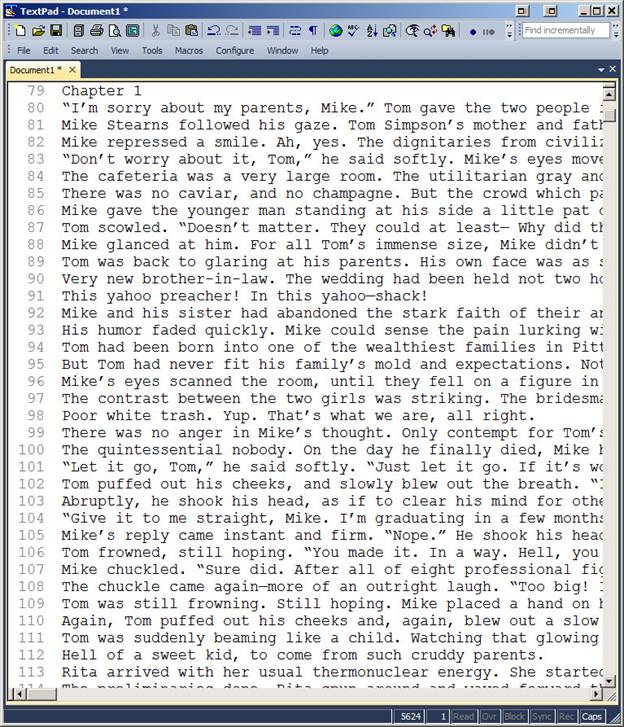
The process itself is simple: You take the document and convert it to plain text. If it’s an RTF or Word document, you simply select ALL, hit copy, and paste it into Textpad.  The result will look something like this:

image001

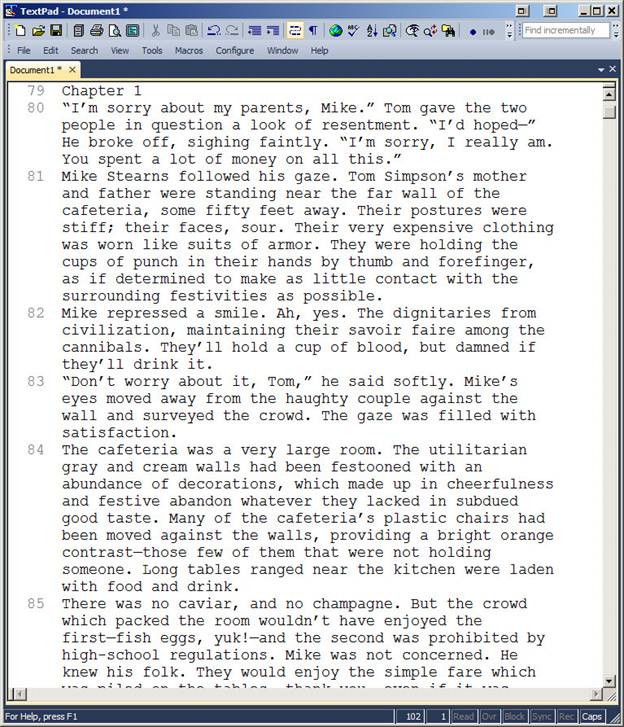
What I normally do is turn on word wrap, so I can see the whole paragraphs as I go. So it looks like this:

image002

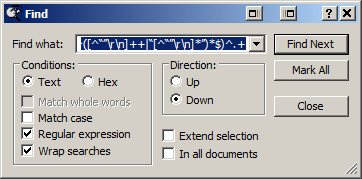
Now, we go hunting. The next step is to set up the search pattern using a regex. The one I use for this is the following: (?!^([^“”\r\n]++|“[^“”\r\n]*”)*$)^.+ Complicated little brute, isn’t it. I didn’t write it, but I knew who to ask if he could write one, and the above is the result. FYI, there’s also one for straight quotes: (?!^([^”\r\n]++|”[^”\r\n]*”)*$)^.+ You use it the same way. So go into find, and put the regex into the “Find what:” box:

image003

Notice that the “Regular expression” box is checked. I also “Wrap searches” just in case I miss something and want to loop around. Click “Find Next” and:

image004

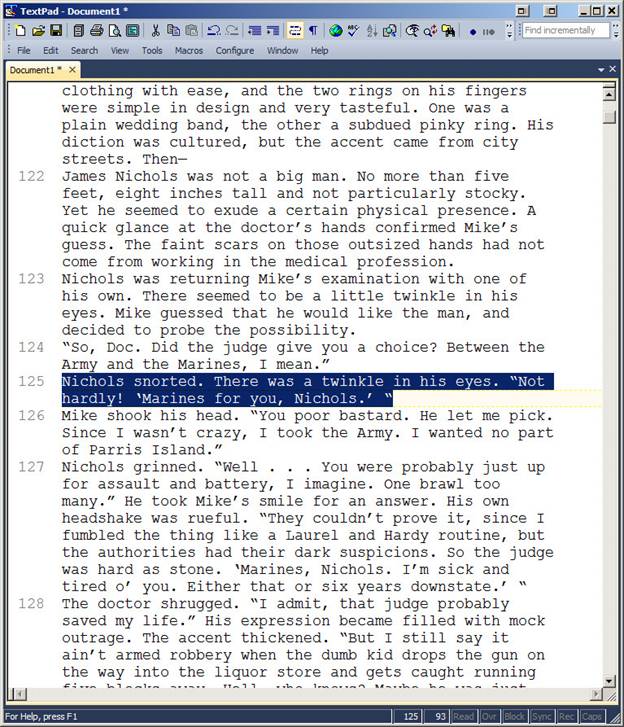
The paragraph highlighted has two opening quotes, one at the beginning and one at the end. Word assumes that a quote preceded by a space is an opening quote, so you need to correct it in your RTF/DOC. Wash, rinse, repeat. You keep doing “find next” all the way through, checking for situations like the following:

image005

As I said, same speaker, next paragraph, so this one is good. This post is getting a little long for a blog entry, what with illustrations, so I’ll break off here. Stay tuned for part two: checking spelling and spelling consistency. In the meantime, here are the RegEx tool commands plus a few bonus goodies: RegExToolCommands.