The Basic Basics of Writing” by Algis Budrys
Want to get the basics in a very succinct article? Read Algis Budrys on story.
Want to get the basics in a very succinct article? Read Algis Budrys on story.
Here’s Joseph Finder, a NY Times best-selling author, talking about how he studied his craft, why he uses outlines, and what he decided about four-letter words and why.
I had the same reaction when my daughter came to me wanting to read my stuff. I’ve never heard of Joseph Finder–there are soooo many authors these days. But I can tell you I’m going to pick up one of his books to see what he’s all about.
Author Mette Harrison writes a column on writing for Orson Card’s Intergalactic Medicine Show. I think you can read them without a subscription. This month’s column had some great insights. Here’s one fab example.
I also recommend that if you want to write a book that readers will not be able to put down, focus on one really good story (more on this next month). I am not saying that you can’t have sub plots or minor characters. You can. But I urge you to make sure that your page count does not obscure which characters are the main ones or what their main goal is. If you have lots of different characters who are in different parts of your world, that is fine. But make sure that they are all working at different ends of the same thread, that they all end up being part of the same story. If you cannot figure out which character is the one you want your readers to care the most about, to root for most desperately, you may have too many characters.
Good advice. There’s more.
I’ve posted two new writer’s lessons that discuss how emotion works and the essential parts of story.
I was invited to present a master class at the 2022 StoryMakers conference in Provo, Utah.
We all want to develop plots that delight readers. Maybe we have ideas for the characters. Maybe we have ideas for the setting. Maybe we even have a couple of scenes.
But a novel needs 40, 50, 60 or more scenes.
How do you figure out what happens next, and do it in a way readers love?
There’s one tool that can help.
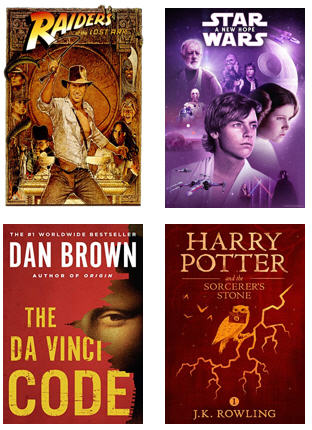
Harry Potter, Lord of the Rings, and The Da Vinci Code all had it. So did Star Wars, Raider of the Lost Ark (1, 2, and 3), Taken, James Bond, The Wheel of Time, and thousands of other stories, TV episodes, and films.
It’s what I call the wanted object, sometimes known as the MacGuffin.
A good MacGuffin will not only make your plotting easier, it can also inject a wow factor into your story that readers love.
In this session, the writers learned what a MacGuffin really is and how you can use it to propel the plot and keep readers turning the page.
Here’s a PDF of the presentation.
2022 john brown – the secret that propels so many blockbuster plots2
And here’s the PDF of the handout.
2022 john brown – the secret that propels so many blockbuster plots handout
Enjoy!
One of the things I enjoy about being an author are the emails I receive from readers. A few months ago I received one from Mr. Edward Bear. He’d purchased Servant and, as he was reading, found an unclosed dialogue quote.
Mr. Bear could have simply noted it and read on. But he did not. Mr. Bear is a proofreader. And so he practiced a bit of wizardry, found that I had a handful of quote goofs, and emailed them to me.
Many of them ended up being weird smart quote issues Word introduced into the text when I broke a line of dialogue with an action like this: “You will not”–he scratched his nose angrily–“share another pair of my panty hose with that woman!”
You’d think that would be enough for a doughty reader. But Mr. Bear didn’t just notify me of the errors. Oh, no. He also included the page from his proofreader’s grimoire that allowed him to find those quote issues in a matter of minutes in the first place.
As soon as I had the time, I tested the spell on Bad Penny, and, voila, in a matter of a few minutes found a couple of issues in that text. I was delighted.
But Mr. Bear wasn’t satisfied with mere delight. He then sent me another page from that grimoire to help with spelling. We luvs wizardly readers, Precious.
Copy editing and proofreading require patience, painstaking reading, and a knowledge of what to look for. You have to know not only the mechanics of the written word (capitalization, spelling grammar, syntax, punctuation, abbreviations, usage, etc.) but also, if you’re reading for a printed edition, interior formatting (widows, orphans, word or hyphen stacks, headers, and so forth). There’s a lot to it. And anything that speeds up the process and minimizes errors is welcome.
If you’re contracting your proofreading out, a cleaner copy can also translate into lower rates. Knowing that many of you who visit this website are writers, and because your host’s generosity knows no bounds, I asked Mr. Bear if he might be willing to share his wizardry with you. The wizard responded with a yes.
By Edward Bear I’m Ed Bear. I work, both professionally and otherwise, as a proofreader. I’ve gone over books for my publisher and I’ve done scan/OCR/check against paper books for republication, both electronic and back-to-treeware. When I mentioned some of the “ancillary tools” I have for aiding the work, John offered me this guest post slot in his blog. Feel free to pass this stuff around. I’ve found these techniques invaluable in getting the job done faster, and with better quality.
First, though, I need to tell you about the tools themselves. The biggest component is the software for electronic text editing. However, I’m NOT talking Word or anything like that. I’m talking about an editing program which can a: work with plain text and b: handle Regular Expressions. (What are those, some of you ask? I’ll get to that.)
Since I’m a windows user, I have two such programs available. My favorite is a program called TextPad (www.textpad.com). I’ve used it for years and it’s become invaluable to my work. They currently charge $28 for a single user license, but IMO, the program’s so useful that, even though upgrades are free, I buy another license every time they bring out a new major release. The other program is free. It’s called NotePad++ (http://notepad-plus-plus.org/) I’ve tested it and it can handle the methods I use, but I haven’t used it much, since TextPad and I are long-time buddies. If anybody out there knows a program for the Macintosh which will do these jobs, please mention it in the comments.
You don’t have to be a wizard to use them. The tutorial over at http://www.regular-expressions.info/tutorial.html describes them elegantly: “Basically, a regular expression is a pattern describing a certain amount of text.” They are also called a regexp or regex, and I’ll be including the regexes I use in this post.
I have a small library of regexes, and two of them are critical to aiding the proofreading process. One of them allows checking dialogue quotemarks, to insure that speech is properly closed off, and the other makes it possible to generate a word list of each unique word in the book. I’ll be walking through the usage, including screenshots.
One of the challenges of checking dialogue passages is that, with one exception, every opening quote (“) needs to have its matching closing quote (”). The exception, of course, is when the same character is speaking in the next paragraph. This can lead to a heavy false positive load if the characters are loquacious.
The first time I tried this stunt, I found 73 paragraphs with unbalanced quotes. Only 6 of them were errors. But being able to find them quickly so they could be fixed in minutes instead of hours? That paid for the effort.
The process itself is simple: You take the document and convert it to plain text. If it’s an RTF or Word document, you simply select ALL, hit copy, and paste it into Textpad. The result will look something like this:
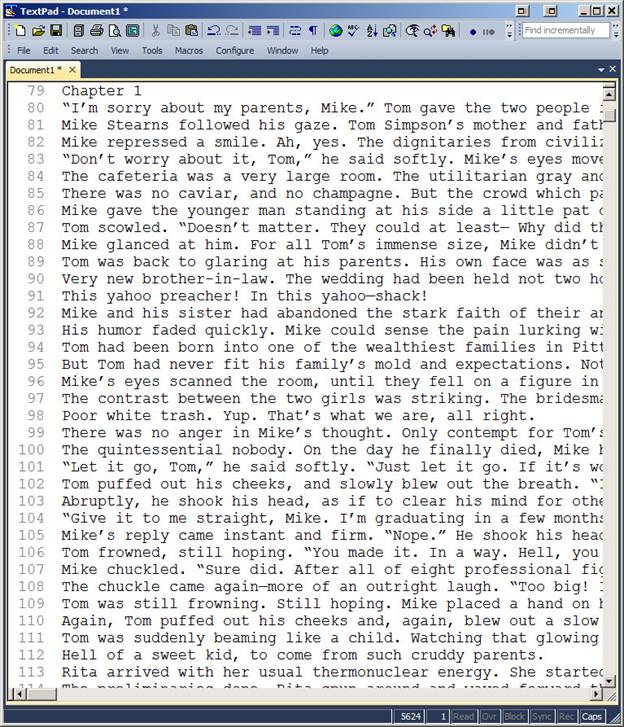
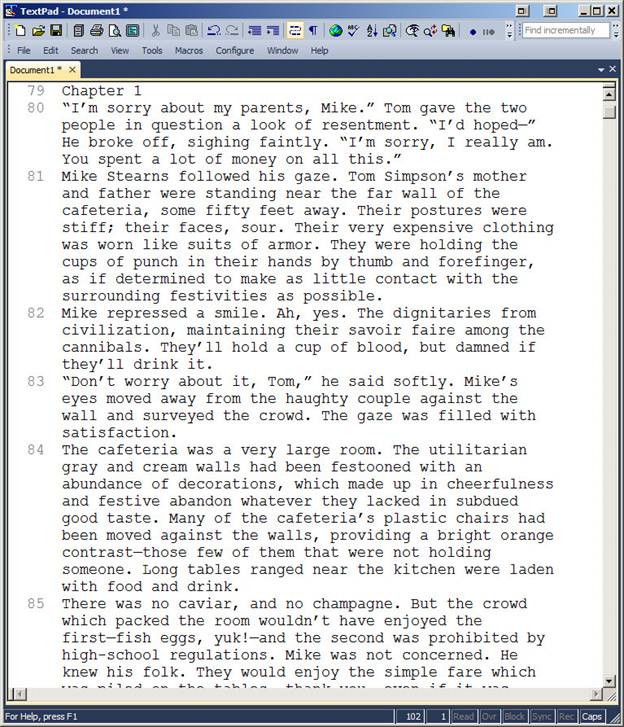
What I normally do is turn on word wrap, so I can see the whole paragraphs as I go. So it looks like this:
Now, we go hunting. The next step is to set up the search pattern using a regex. The one I use for this is the following: (?!^([^“”\r\n]++|“[^“”\r\n]*”)*$)^.+ Complicated little brute, isn’t it. I didn’t write it, but I knew who to ask if he could write one, and the above is the result. FYI, there’s also one for straight quotes: (?!^([^”\r\n]++|”[^”\r\n]*”)*$)^.+ You use it the same way. So go into find, and put the regex into the “Find what:” box:
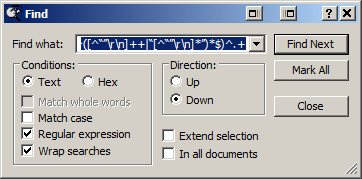
Notice that the “Regular expression” box is checked. I also “Wrap searches” just in case I miss something and want to loop around. Click “Find Next” and:
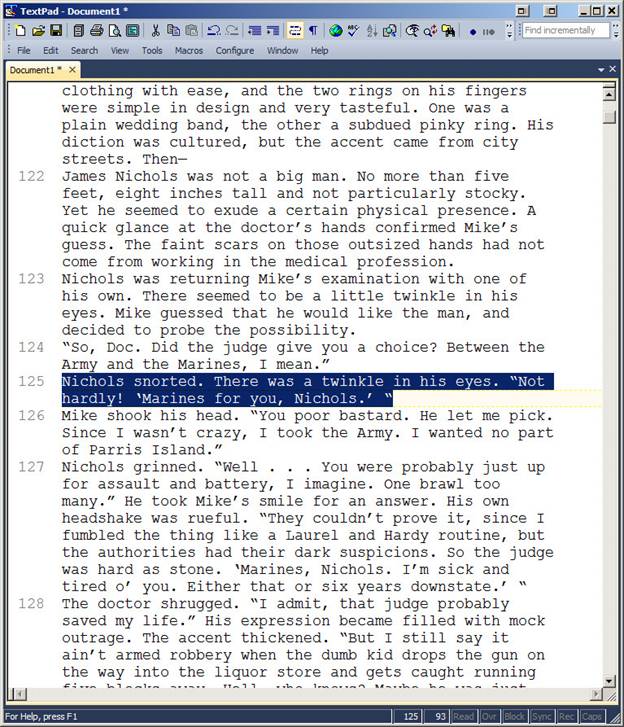
The paragraph highlighted has two opening quotes, one at the beginning and one at the end. Word assumes that a quote preceded by a space is an opening quote, so you need to correct it in your RTF/DOC. Wash, rinse, repeat. You keep doing “find next” all the way through, checking for situations like the following:

As I said, same speaker, next paragraph, so this one is good. This post is getting a little long for a blog entry, what with illustrations, so I’ll break off here. Stay tuned for part two: checking spelling and spelling consistency. In the meantime, here are the RegEx tool commands plus a few bonus goodies: RegExToolCommands.
Comments are closed.

Good article. I just finished reading “Story” by Robert McKee, which it reminded me of in a lot of ways.
It IS good.
However, one thing it’s missing is surprise. Stories thrive on the unexpected disaster and twist. It’s also missing the fact that the disasters are often yes-but turns. So many times it looks as if the hero actually succeeds, but we find out very soon they haven’t. And “problem” isn’t quite enough. Any old problem won’t do. It has to be a problem that meets certain criteria. Still, it’s an excellent article. For the basic basics, it’s perfect.
I’m interested in hearing what are the criteria for a good problem.
You’re coming to LTUE, right? I’ll be talking about it then.